Find any file — or any picture — by asking.
Nook is a calm reading room for the files on your Mac. Ask for “pdfs from last week over 5 MB”, describe a photo you half remember, or type a word you saw in a screenshot. Nook finds it, says why it matched, and highlights the words right on the picture. All on your Mac.
Pay once · macOS 14+ · Apple silicon & Intel · Works offline · ~5 MB download · Already bought? Download Nook
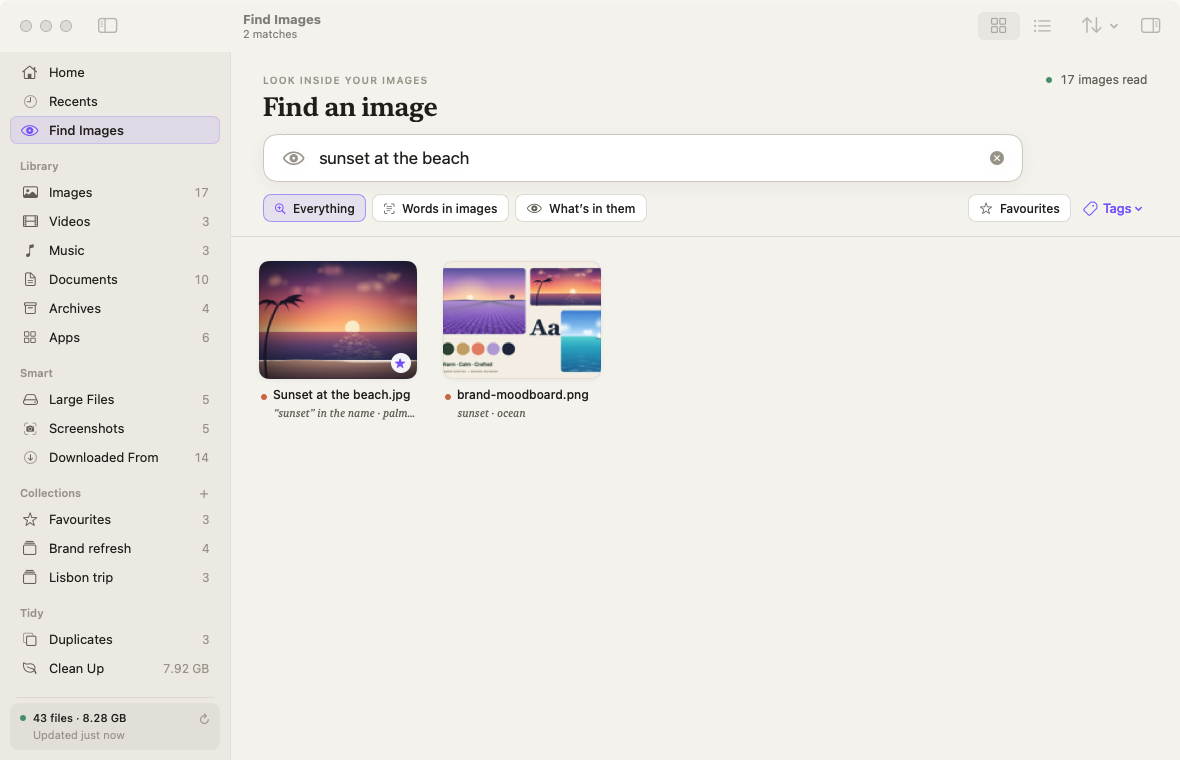
A working model, not a video. It searches a made-up sample folder, not your Mac: the page can’t see your files. The real app reads your folders, and the pictures in them, on your Mac.
- Pay once, no subscription
- No account
- Pictures never leave your Mac
- No model to download
- Native on Apple silicon & Intel
- 14-day refund
You remember the picture, not the filename.
“IMG_2214.HEIC” means nothing. “A white island in a blue ocean” does. Nook looks at each picture once and notes the things, scenes and colours in it, plus any words. Then you describe what you remember.
It uses the image recognition already built into macOS, so there’s nothing to download and it works offline. It knows over a thousand everyday things and scenes. It handles short descriptions, not long sentences about where things sit, and descriptions are in English for now. Under every result, a short note in italics says why it matched.
Type a word you saw. In your language.
Screenshots, photos of receipts, menus and whiteboards: Nook reads the words in them with Apple’s on-device text recognition and highlights each match on the picture.
CAFÉ LUMEN
Flat white · 4.20
Oat cappuccino · 4.60
TOTAL · €18.50
receipt-cafe.jpg — “cappuccino” in it
Nook reads every language Apple’s text recognition offers on your Mac: 30 on macOS 26, including English, Spanish, French, German, Italian, Portuguese, Chinese, Japanese, Korean, Russian, Ukrainian, Thai, Vietnamese and Arabic. Hindi isn’t offered by macOS yet. Settings › Images shows what your Mac can read, and Nook picks up new languages when macOS adds them. Matching ignores case and accents, so “bacalhau a bras” finds “Bacalhau à Brás”.
Ask once. Find it again.
Big thumbnails instead of tiny icons, a search bar that understands you, and careful tools for the clutter. Each one is a shortcut away.
Ask in plain English
“screenshots from today”, “big videos older than 6 months”. Each phrase Nook understands turns into a token you can remove, so you always see how it read you.
Describe a picture to find it
Things, scenes and colours, like “sunset at the beach” or “blue and white”. Each result carries a note saying why it matched.
Words inside images
Screenshots, photos and scans become searchable in every language macOS text recognition offers (30 on macOS 26). Matches are highlighted on the image.
More like this
Pick any picture and see the ones that look like it, nearest first. Good for finding the other shots from that afternoon.
Quick Search from any app
⇧⌘Space (or a shortcut you choose) opens a small panel. ↩ opens, Space previews, ⌘C copies the image, ⌘T copies its text, ⌘R shows it in Finder, ⌘⌫ moves it to the Trash.
Favourites, tags and collections
Gather files from anywhere without moving them. Search them with “#receipts” or “my favourite photos”.
Downloaded From
Every download grouped by where it came from: Gmail, Google Drive, ChatGPT, Slack, WhatsApp and any website. Ask for “pdfs from gmail”.
Duplicates and look-alikes
Byte-identical copies and burst photos, with a sensible copy kept and the rest one click from the Trash.
Clean Up you can trust
Forgotten downloads, old installers, stale screenshots and unused apps. Nothing moves until you review it, and everything goes to the Trash with Undo.
Big thumbnails, real previews
A grid that shows what files are, Quick Look on Space, and an inspector that reads each file like an index card.
Comparing Finder alternatives? Read the guide: the best Finder alternatives for Mac
Ask Nook from anywhere.
Press ⇧⌘Space in any app and a small Quick Search panel drops in. Type, arrow down, press Space for a closer look. It’s the same plain-English search and the same picture search as the main window.
Quick Search is on by default and its shortcut can be changed or switched off in Settings. Nook needs no Accessibility, Screen Recording or Full Disk Access permission.
Quick Search, from any app
Ask Nook in the main window
Find Images: describe it, or type its words
More like the selected picture
Add to Favourites
Copy the text from several images at once
Every screen, light and dark.
Screenshots straight from Nook, with a sample folder. Flip between light and dark.


What stays. What connects.
Looking inside your pictures happens on your Mac, with Apple’s Vision framework. No cloud, no model download.
Stays on your Mac
Your files, and everything Nook learns about them.
- ✓Your files and picturesRead where they are; never moved or renamed on its own
- ✓What Nook reads in imagesWords, things, colours and likeness, in Nook’s own folder on your Mac
- ✓Favourites, tags and collectionsReferences to files, nothing copied
- ✓What you search forNo analytics or tracking in the app
Connects
Two small requests, over HTTPS.
- 1License checkYour key and an activation ID, to Dodo Payments
- 2Update checkApp name and version, to
nook.newmac.app
The full list, for every app, is in the privacy policy.
Pay once. Keep it.
One payment, no subscription. Choose how many Macs you’ll use Nook on.
3 Macs
For your home and work Macs
Checkout opens soon. The buttons above go live here the moment it does.
Every plan includes
- One payment, no subscriptionEvery feature, yours to keep.
- License key by emailSent the moment you pay. Activate in one click.
- Move between MacsUse “Deactivate this Mac”, then activate on the new one.
- Free updatesNew versions install themselves.
- 14-day refundNot for you? Read the refund policy.
- macOS 14 or laterNative on Apple silicon & Intel.
Already bought? Download Nook · .zip · Install help
Questions, answered.
Do my files or pictures leave my Mac?
No. Indexing, text recognition, image descriptions and search all run on your Mac. Nook only goes online to activate your license and check for updates — see the privacy policy.
Does image search need a model download?
No. Nook uses the image recognition built into macOS, so describing pictures works as soon as Nook has looked at them, even offline.
Which languages can it read in images?
Whatever Apple’s text recognition supports on your version of macOS. On macOS 26 that’s 30 languages, including English, Spanish, Chinese, Japanese, Korean, Russian, Thai and Arabic. Hindi isn’t offered by macOS yet. Nook shows which languages your Mac can read in Settings › Images and picks up new ones automatically.
How good is “describe it”?
It recognises over a thousand everyday things and scenes, plus colours, and uses the words inside a picture as clues: a café receipt that says “cappuccino” matches “coffee”. It understands short descriptions, not long sentences about how things are arranged, and descriptions are English-only for now.
Which folders does it look in? Will it move my files?
Desktop, Documents, Downloads, Pictures, Movies, Music and any folder you add, and you can limit image search to chosen folders. Nook never moves or renames files on its own. Favourites, tags and collections are references, and anything you remove goes to the Trash with Undo.
Will it ask for permissions?
macOS asks once for access to Desktop, Documents and Downloads (and an external drive, if you add one). Click Allow for each. Nook doesn’t need Accessibility, Screen Recording or Full Disk Access.
What doesn’t it do?
It doesn’t search the scanned pages inside PDFs or the frames inside videos, sync to iCloud, edit images, or replace Finder for copying and renaming. The first look through a very large library takes a while; it runs in the background and can be paused.
Does Nook replace Finder?
No, it sits next to it. Nook shows the same files in a friendlier way, and “Show in Finder” is always one click away.
macOS says it can’t verify the developer.
Nook is distributed directly from this website instead of the App Store, so macOS asks you to confirm the first time. Here’s how to open it.
Is there a free trial?
No. Use the working model at the top of this page, and the screenshots of the real app, to see exactly how Nook works. If it turns out not to be for you, you can ask for a refund within 14 days — see the refund policy.
Can I use Nook on more than one Mac?
Yes. The 3-Mac and 5-Mac plans cover several Macs with one license key. Any license can move to a new Mac: choose “Deactivate this Mac” in Nook on the old one, then activate on the new one.

Stop digging. Just ask.
Nook starts reading your folders the moment it opens, and pictures join the search as it looks at them, quietly, in the background.